TP-Link reveals 'world's first Wi-Fi 8 lineup' at IFA 2026 with Archer 9 Ultra router and Deco 8 Ultra mesh Wi-Fi system
TP-Link has unveiled two new Wi-Fi 8 routers at IFA 2026 The Archer 9 Ultra is a traditional router with a smart design and coverage of up to 3,600 square feet The Deco 8 Ultra is a mesh system, and a 3-pack is good for a home of up to 9,800 square feet TP-Link has revealed the world's first Wi-Fi 8
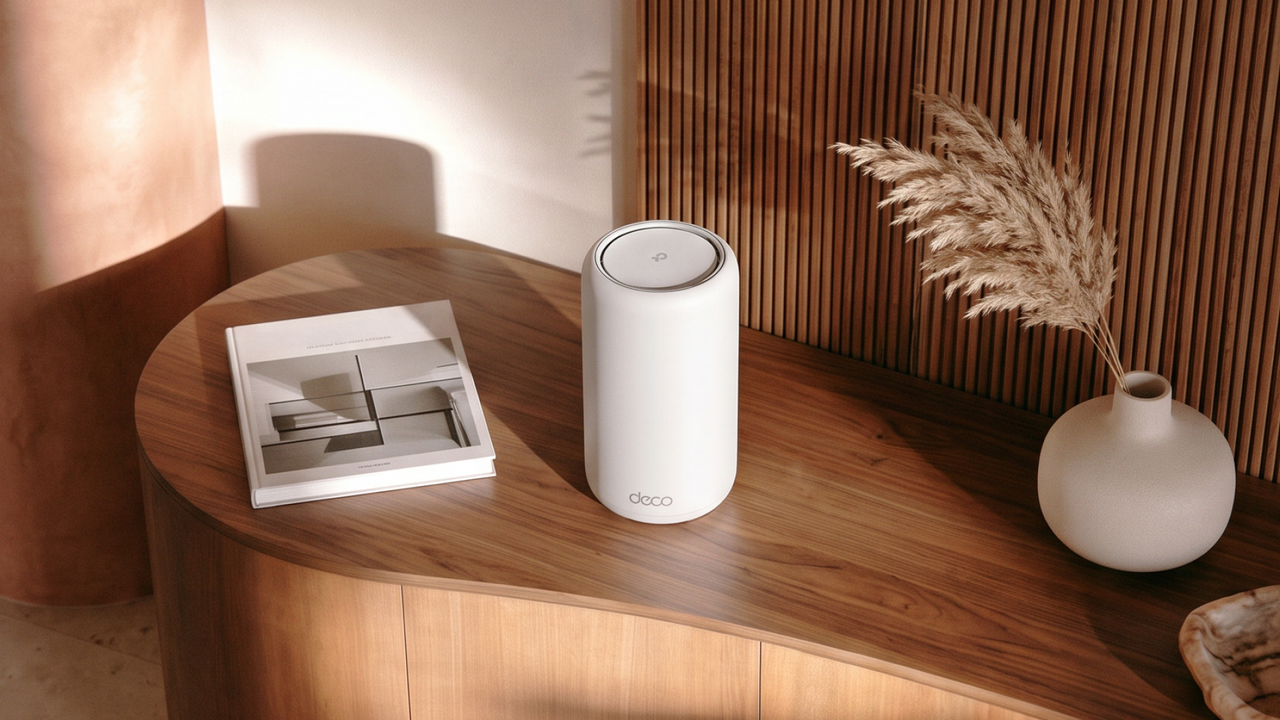
<![CDATA[ <article> <ul><li><strong>TP-Link has unveiled two new Wi-Fi 8 routers at IFA 2026</strong></li><li><strong>The Archer 9 Ultra is a traditional router with a smart design and coverage of up to 3,600 square feet</strong></li><li><strong>The Deco 8 Ultra is a mesh system, and a 3-pack is good for a home of up to 9,800 square feet</strong></li></ul><p>TP-Link has revealed the world's first Wi-Fi 8 <a href="https://www.techradar.com/news/networking/routers-storage/best-router-9-top-wireless-routers-on-test-1090523">routers</a> at <a href="https://www.techradar.com/tag/ifa">IFA 2026</a>, with two models arriving in the form of a standard router and a <a href="https://www.techradar.com/news/best-wireless-mesh-routers">mesh Wi-Fi</a> offering.</p><p>These are the Archer 9 Ultra router and the Deco 8 Ultra, the latter being the mesh Wi-Fi system. Both are built around TP-Link's Wi-Fi 8 StabilityEngine.</p><p>With the Deco 8 Ultra, you're getting a tri-band (including 6GHz) Wi-Fi 8 mesh system offering a speed of 22Gbps (19Gbps in Europe). A 3-pack of these cylindrical routers can cover a home of up to 9,800 square feet, with support for 200+ devices.</p><p>The Archer 9 Ultra boasts a tri-band speed of 19Gbps and bristles with 18 antennas, delivering coverage of up to 3,600 square feet in your home (or 3,000 square feet in Europe).</p><p>TP-Link underlines three key benefits of these routers thanks to Wi-Fi 8. First, they are more reliable with a greater number of devices hooked up, and they also cope much better with interference. Finally, Wi-Fi 8 allows for a better wireless connection at the edge of the system's effective range.</p><p>Handling devices more reliably is facilitated by Dynamic Sub-band Operation (DSO) and Non-Primary Channel Access (NPCA) tech. The former ensures every connected device gets only the bandwidth it needs — so more is open for other usage — and NPCA opens a second channel if the main one gets too busy. Or as TP-Link puts it, "Every device gets its own fast lane."</p><p>New modulation technology in these routers helps to deal with interference from other devices or nearby networks (like your neighbor's Wi-Fi), and boosts performance at longer distances from the router.</p><p>There are also Enhanced Long Range (ELR) and Distributed Resource Units (DRU) features with these Wi-Fi routers, which further strengthen the wireless signal at the edge of its reach.</p><p>TP-Link notes, "ELR extends the router's usable range, while DRU concentrates a device's limited uplink power into a narrower band so it can be heard clearly from far away. Uploads, calls, and camera feeds hold where they used to stutter."</p><p>Both routers benefit from a smart and contemporary design, with a minimalist and streamlined look. TP-Link argues that it needs to make its hardware look good so it won't be hidden away in a cupboard or under a table.</p><p>Gary Chang, Lead Industrial Designer at TP-Link, commented, "We stopped building a piece of networking equipment and started designing for the home. When a router's design becomes something people want to display, it ends up exactly where it performs best."</p><h2 id="analysis-ready-for-the-future-of-wi-fi">Analysis: ready for the future of Wi-Fi</h2><figure class="van-image-figure inline-layout" data-bordeaux-image-check ><div class='image-full-width-wrapper'><div class='image-widthsetter' style="max-width:1920px;"><p class="vanilla-image-block" style="padding-top:56.25%;"><img id="nWCFSVs249iedSLPUDhi9M" name="TP-Link Archer 9 Ultra router" alt="TP-Link Archer 9 Ultra router shown on a table next to a laptop" src="https://cdn.mos.cms.futurecdn.net/nWCFSVs249iedSLPUDhi9M.png" mos="" align="middle" fullscreen="" width="1920" height="1080" attribution="" endorsement="" class="inline"></p></div></div><figcaption itemprop="caption description" class=" inline-layout"><span class="credit" itemprop="copyrightHolder">(Image credit: TP-Link)</span></figcaption></figure><p><a href="https://www.techradar.com/pro/wi-fi-8-wont-be-faster-but-will-be-better-more-details-about-next-wi-fi-emerges-just-hours-after-wi-fi-7-protocols-are-officially-ratified">Wi-Fi 8 doesn't deliver any speed boost over Wi-Fi 7</a>, at least not in terms of raw performance — but it does aim to improve performance by delivering a stronger signal when you're further away from the router, and a more reliable connection overall. Part of that strategy is to better deal with interference from other wireless networks (or appliances in general), and as TP-Link observes, this is a big part of the puzzle here.</p><p>We don't yet have a release date (or price) for the Archer 9 Ultra or Deco 8 Ultra, but the expectation is that these routers will ship later this year. Of course, to get the benefit of a Wi-Fi 8 router, you'll need devices that support the new wireless standard, too — and they won't be here for a while yet.</p><p>Indeed, the Wi-Fi 8 standard itself is still a draft and not finalized, and the likes of smartphones and laptops won't arrive with Wi-Fi 8 support until next year (and there probably won't be very many of them, either, to begin with).</p><p>That said, your Wi-Fi 7 (or earlier) devices will still run just fine on a Wi-Fi 8 router, because as ever, the new standard is fully backwards compatible — you just won't get the benefits that Wi-Fi 8 phones and laptops will (when they arrive).</p><p>That said, some of the improved traffic management and interference reduction tech in these routers will still help with devices that don't support Wi-Fi 8. However, buying a Wi-Fi 8 router later this year when these TP-Link models (and others) emerge is more about future-proofing than anything else for now.</p> </article> ]]>
Read the full article on TechRadar
Read Full Article →