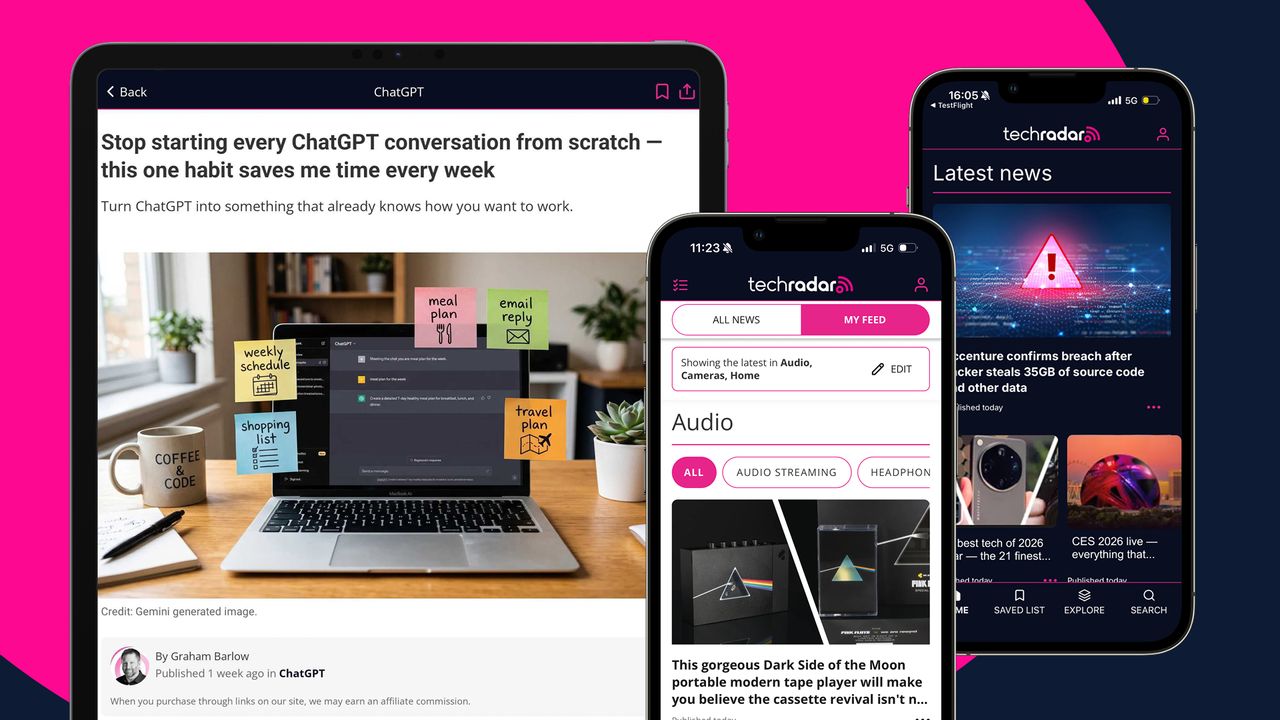
TechRadar now has an app — here's what you need to know
We're a bunch of gadget obsessives here at TechRadar, so we appreciate that your phone's home screen is premium real estate.
<![CDATA[ <article> <p>We're a bunch of gadget obsessives here at TechRadar, so we appreciate that your phone's home screen is premium real estate. But if you're a TechRadar reader, you're going to want to find room on that home screen for our new app. </p><p>That's right, TechRadar now has an app! We've been working hard to bring you a new way to enjoy our content, with useful features that will enable you to enjoy a more personalized experience. </p><p>These new features have been designed to make it easy for you to stay up to date when you're on the go, from finding new ways to discover stories to letting you save articles to read later.</p><p>We'll be looking to add more features as we grow, so don't be shy about telling us what you think about the TechRadar app, which you can do by emailing the team, or by leaving us a comment below.</p><iframe title="Tell us what you think in the comments" description="Found a bug? Have a feature request? Let us know" minimumCommentCount="0" class="position-center" data-lazy-priority="high" data-lazy-src=""></iframe><h3 class="article-body__section" id="section-how-to-download-the-techradar-app"><span>How to download the TechRadar app</span></h3><figure class="van-image-figure inline-layout" data-bordeaux-image-check ><div class='image-full-width-wrapper'><div class='image-widthsetter' style="max-width:1920px;"><p class="vanilla-image-block" style="padding-top:56.25%;"><img id="uyLcXvEuZueMfttCgvPp4d" name="TR-app-download-ad" alt="An ad for the TechRadar app with copy saying 'Download our brand new app' next to two phones displaying the app" src="https://cdn.mos.cms.futurecdn.net/uyLcXvEuZueMfttCgvPp4d.jpg" mos="" align="middle" fullscreen="" width="1920" height="1080" attribution="" endorsement="" class="inline"></p></div></div><figcaption itemprop="caption description" class=" inline-layout"><span class="caption-text">You can find the TechRadar app in both iOS and Android </span><span class="credit" itemprop="copyrightHolder">(Image credit: Future)</span></figcaption></figure><p>You can find us in the <a href="https://apps.apple.com/us/app/techradar-technology-experts/id6753220763" target="_blank">App Store</a> and <a href="https://play.google.com/store/apps/details?id=com.futureplc.peregrine.techradar" target="_blank">Google Play</a> simply by searching 'TechRadar'. Look for our distinctive pink radar logo and you'll know it's the right app. </p><p>The best part? It's completely <strong>FREE</strong> to download, though you'll need a free account to read unlimited articles — you can only read five articles without signing in. To unlock the full experience, you can create a free account directly in the app.</p><p>By creating an account, you'll also automatically unlock membership and become an official <a href="https://www.techradar.com/membership" target="_blank">TechRadar Insider</a>, giving you the ability to comment on articles, vote in polls, play quizzes and more. </p><p>Prefer a cleaner experience? You can subscribe to our ad-free version for $1.99 / £1.99 a month or $19.99 / £19.99 annually — it's a great way to support our work.</p><h3 class="article-body__section" id="section-new-useful-features-to-explore"><span>New useful features to explore</span></h3><ul><li><strong>Save articles to your bookmarks to easily read later</strong></li><li><strong>Personalize your feed to follow the topics you’re most interested in</strong></li><li><strong>Find what you’re looking for fast with a search tool</strong></li><li><strong>Turn on push notifications to stay updated with breaking tech news</strong></li></ul><figure class="van-image-figure inline-layout" data-bordeaux-image-check ><div class='image-full-width-wrapper'><div class='image-widthsetter' style="max-width:1920px;"><p class="vanilla-image-block" style="padding-top:56.25%;"><img id="SAiFdE2X9Dku2DB5dQgQhf" name="TR-app-news-and-reviews" alt="Two iPhones showing the TechRadar app" src="https://cdn.mos.cms.futurecdn.net/SAiFdE2X9Dku2DB5dQgQhf.jpg" mos="" align="middle" fullscreen="" width="1920" height="1080" attribution="" endorsement="" class="inline"></p></div></div><figcaption itemprop="caption description" class=" inline-layout"><span class="caption-text">Discover the latest news, features and reviews </span><span class="credit" itemprop="copyrightHolder">(Image credit: Future)</span></figcaption></figure><p>Now that you're all set up, you should have full access to the TechRadar app, which is essentially everything you love about our site available in app form, and with new features.</p><p>The home page works just as it does on our site, showing the latest news and features across across our main categories, including phones, computing, cameras, and streaming. </p><p>Want a tailored experience? You can simply toggle from 'All News' to 'My Feed' on the home page, and select your interests to start curating your own bespoke news feed.</p><p>You can also bookmark articles to read later by clicking the bookmark symbol at the top of an article, and you'll be able to find your articles in a new 'Saved List' in the app. </p><figure class="van-image-figure inline-layout" data-bordeaux-image-check ><div class='image-full-width-wrapper'><div class='image-widthsetter' style="max-width:1920px;"><p class="vanilla-image-block" style="padding-top:56.25%;"><img id="jiWPtw7dzRob7H2jw9Ne9j" name="TR-app-save-and-personalise" alt="Two iPhones showing the TechRadar app" src="https://cdn.mos.cms.futurecdn.net/jiWPtw7dzRob7H2jw9Ne9j.jpg" mos="" align="middle" fullscreen="" width="1920" height="1080" attribution="" endorsement="" class="inline"></p></div></div><figcaption itemprop="caption description" class=" inline-layout"><span class="caption-text">Personalize your home feed and save articles to read for later </span><span class="credit" itemprop="copyrightHolder">(Image credit: Future)</span></figcaption></figure><p>Expect to receive the same push notifications in the app as on our site if you enable them on your device, allowing you to stay updated on breaking tech news as it happens.</p><p>There's also a new search tool, and a discover feed that lets you filter articles by type and date range to find the coverage you're most interested in — handy, right? </p><figure class="van-image-figure inline-layout" data-bordeaux-image-check ><div class='image-full-width-wrapper'><div class='image-widthsetter' style="max-width:1920px;"><p class="vanilla-image-block" style="padding-top:56.25%;"><img id="LaqBQJsdAk4ZxQZ8Uis4zk" name="TR-app-search-and-explore" alt="Two iPhones showing the TechRadar app" src="https://cdn.mos.cms.futurecdn.net/LaqBQJsdAk4ZxQZ8Uis4zk.jpg" mos="" align="middle" fullscreen="" width="1920" height="1080" attribution="" endorsement="" class="inline"></p></div></div><figcaption itemprop="caption description" class=" inline-layout"><span class="caption-text">Stay up to date and search for articles </span><span class="credit" itemprop="copyrightHolder">(Image credit: Future)</span></figcaption></figure><p>We're still working on new features, and have a few ideas for even more up our sleeves, so if you have any feedback or suggestions, let us know in the comments below. </p><div style="min-height: 250px;"> <div class="kwizly-quiz kwizly-evyYDX"></div> </div> <script src="https://kwizly.com/embed/evyYDX.js" async></script> </article> ]]>
Read the full article on TechRadar
Read Full Article →