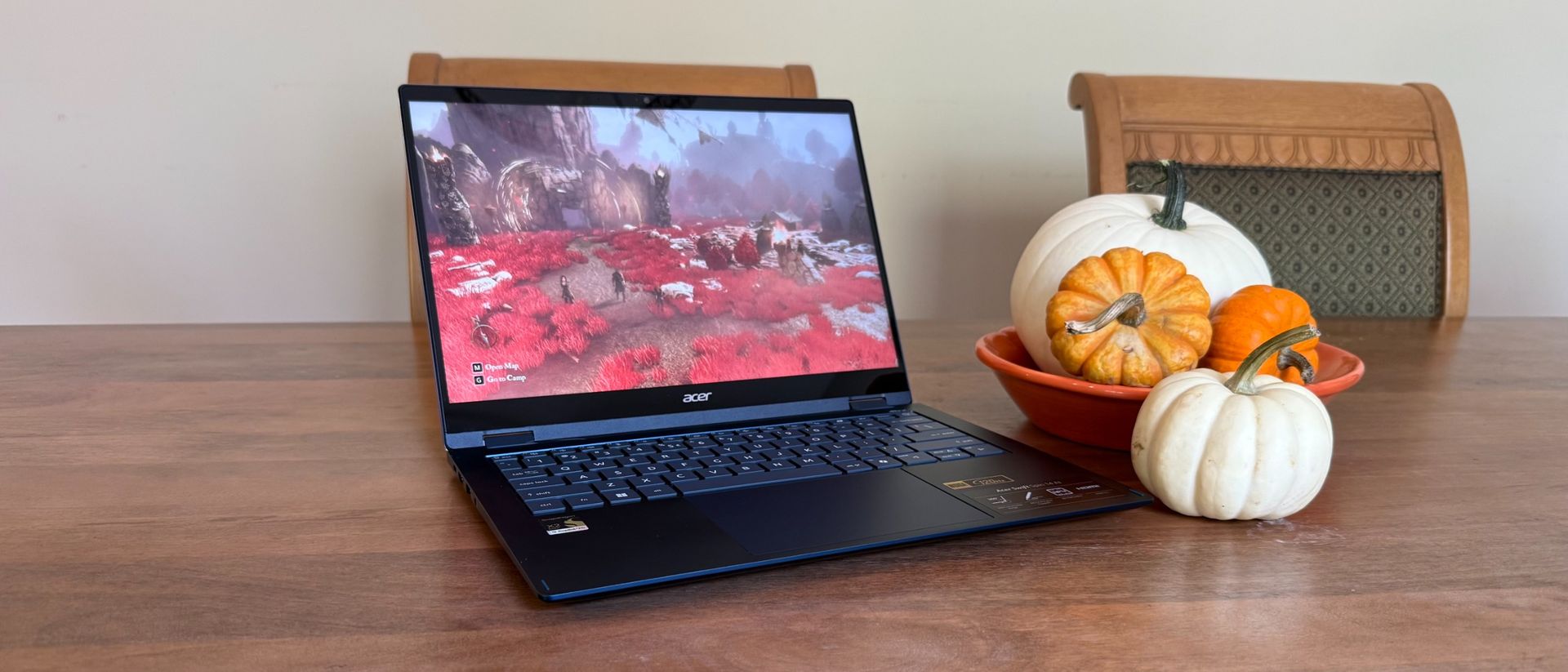
Acer Swift Spin 14 AI is attractive, powerful with a great battery... and a bit pricey
Acer Swift Spin 14 AI review: Two Minute Review The Acer Swift Spin 14 AI is an easy recommendation outside of its price tag.
<![CDATA[ <article> <h3 class="article-body__section" id="section-acer-swift-spin-14-ai-review-two-minute-review"><span>Acer Swift Spin 14 AI review: Two Minute Review</span></h3><p>The Acer Swift Spin 14 AI is an easy recommendation outside of its price tag. It’s light, slim, and pretty attractive in its one colorway. It also comes with a touchscreen and an incredibly smooth 360-degree hinge that makes putting it in tent or tablet mode very easy outside of swinging around a 14-inch piece of hardware. If you’re looking for one of the <a href="https://www.techradar.com/news/mobile-computing/laptops/best-laptops-1304361"><u>best laptops</u></a> with 2-in-1 capabilities, I think this laptop fits right in.</p><p>It’s surprisingly powerful for a laptop that relies on integrated graphics (rather than a discrete GPU) – I was able to do some semi-serious gaming on it, though with some compromises – and it comes with a battery life that competes with the best. </p><p>Besides the lacklustre sound quality, which I expect on even the <a href="https://www.techradar.com/news/mobile-computing/laptops/best-ultrabook-18-top-thin-and-lights-1054355"><u>best Ultrabooks</u></a> since they’re so thin, the main issue I have with the laptop is the price tag. Considering everything I’ve mentioned above, as well as the included AI apps, I don’t think the laptop is overpriced. But at about a grand and a half, it’s not quite the value proposition that I expect from Acer, either. Of course, knowing the company, that price will probably come down before long.</p><figure class="van-image-figure inline-layout" data-bordeaux-image-check ><div class='image-full-width-wrapper'><div class='image-widthsetter' style="max-width:2560px;"><p class="vanilla-image-block" style="padding-top:56.25%;"><img id="zzEHRAXTPEkdSGLZqPBmbe" name="Acer Swift Spin 14 AI streaming" alt="The Acer Swift Spin 14 AI has no issues streaming whatever content you want." src="https://cdn.mos.cms.futurecdn.net/zzEHRAXTPEkdSGLZqPBmbe-1920-80.jpg" mos="" align="middle" fullscreen="" width="2560" height="1440" attribution="" endorsement="" class="inline"></p></div></div><figcaption itemprop="caption description" class=" inline-layout"><span class="caption-text">The Acer Swift Spin 14 AI has no issues streaming whatever content you want. </span><span class="credit" itemprop="copyrightHolder">(Image credit: Future / James Holland)</span></figcaption></figure><h3 class="article-body__section" id="section-acer-swift-spin-14-ai-review-price-availability"><span>Acer Swift Spin 14 AI review: Price & Availability</span></h3><ul><li><strong>How much does it cost?</strong> $1,499.99 / £1,399 (about AU$2,150)</li><li><strong>When is it available?</strong> Available now</li><li><strong>Where can you get it? </strong>Available in the US and UK</li></ul><p>The Acer Swift Spin 14 AI is available for $1,499.99 / £1,399 (about AU$2,150) in the United States and the United Kingdom. It doesn’t seem to be available in Australia at the time of writing, but Acer does have a landing page for the model, so that might change in the very near future.</p><p>If you’re wondering about what kind of upgrades you can make or configurations you can choose from, you’re in for a rude awakening. There’s just one version of this laptop on the market, and it comes with the Snapdragon X2 Elite CPU (with 80 tops), integrated Adreno graphics, 16GB of RAM, and a 512GB SSD.</p><p>The <a href="https://www.techradar.com/computing/windows-laptops/hp-omnibook-ultra-flip-14-review#section-hp-omnibook-ultra-flip-14-review-price-availability"><u>HP OmniBook Ultra Flip 14</u></a> might be a bit heavier and have issues with its stylus storage, but it comes with a nicer OLED screen for the same price (it’s actually available at a lower price through some retailers at the time of writing). Plus, it has a few different configurations if you want more RAM or SSD.</p><p>The <a href="https://www.techradar.com/computing/macbooks/apple-macbook-air-13-inch-m5-review"><u>Apple 13-inch MacBook Air (M5)</u></a> might not be a <a href="https://www.techradar.com/news/best-windows-laptop">Windows laptop</a> or a <a href="https://www.techradar.com/news/mobile-computing/laptops/best-2-in-1-laptops-top-5-hybrid-laptops-reviewed-1258451">2-in-1,</a> but it is still the standard that we compare most <a href="https://www.techradar.com/news/mobile-computing/laptops/best-ultrabook-18-top-thin-and-lights-1054355">Ultrabooks</a> to. It’s attractive, easy to use, and lightweight, with great battery life. Plus, it starts at a lower price tag of $1,099 / £1,099 / AU$1,799.</p><ul><li><strong>Value score: </strong>4 / 5</li></ul><h3 class="article-body__section" id="section-acer-swift-spin-14-ai-review-specs"><span>Acer Swift Spin 14 AI review: specs</span></h3><p>The Acer Swift Spin 14 AI may only come in one configuration, but its Snapdragon X2 Elite X2E78100 with 12 cores (boost up to 4.0GHz) and 80 TOPS NPU (neural processing unit), integrated Qualcomm Adreno graphics, and 16GB of RAM are more than enough power for an on-the-go 2-in-1 laptop like this. The 512GB SSD is good, though it would be nice to be able to upgrade to more storage.</p><div ><table><thead><tr><th class="firstcol empty" ></th><th ><p>Base</p></th></tr></thead><tbody><tr><td class="firstcol " ><p>Price</p></td><td ><p>$1,499.99 / £1,399 (about AU$2,150)</p></td></tr><tr><td class="firstcol " ><p>CPU</p></td><td ><p>Qualcomm Snapdragon X2 Elite X2E78100</p></td></tr><tr><td class="firstcol " ><p>GPU</p></td><td ><p>Qualcomm Adreno</p></td></tr><tr><td class="firstcol " ><p>RAM</p></td><td ><p>16GB LPPDDR5X</p></td></tr><tr><td class="firstcol " ><p>Storage</p></td><td ><p>512GB PCIe Gen4 SSD</p></td></tr><tr><td class="firstcol " ><p>Display</p></td><td ><p>14" diagonal, WUXGA (1920 x 1200) touch display up to 120Hz, 300 nits</p></td></tr><tr><td class="firstcol " ><p>Ports and Connectivity</p></td><td ><p>2x USB-4 Type C, 2x USB-3.2 Type A, HDMI 2.1, Aux</p></td></tr><tr><td class="firstcol " ><p>Wireless</p></td><td ><p>Realtek Wi-Fi 7 (2x2) and Bluetooth 6</p></td></tr><tr><td class="firstcol " ><p>Camera</p></td><td ><p>5M IR HDR Webcam (2880 x 1800) and Privacy Shutter with Blue Glass</p></td></tr><tr><td class="firstcol " ><p>Dimensions</p></td><td ><p>2.95 pounds (1.34 kg)</p></td></tr><tr><td class="firstcol " ><p>Weight</p></td><td ><p>12.35 x 9.07 x 0.59/0.63 inches /</p><p>313.8 x 230.26 x 14.96/15.95 mm</p></td></tr></tbody></table></div><p>Since there’s only one configuration, there’s no upgrading the screen either, which has a 1920x1200 16:10 ratio touch screen that can support up to 120Hz refresh rate. Likewise, it’s only available in Cobalt Blue.</p><h3 class="article-body__section" id="section-acer-swift-spin-14-ai-review-design"><span>Acer Swift Spin 14 AI review: Design</span></h3><ul><li><strong>Attractive build</strong></li><li><strong>USB-C port on either side</strong></li><li><strong>Keyboard is good but not great</strong></li></ul><p>I say that it’s only available in Cobalt Blue, as if that’s a bad thing. In fact, it’s a very attractive dark-ish metallic blue aluminum chassis that’s accented on the lid with silver etchings, giving it an almost space age feel. I like it.</p><p>I also like the fact that not only is the port selection pretty comprehensive but that it spreads the ports pretty evenly. Each side has a USB-C port so you don’t have to worry about your orientation to an outlet when you need to charge up – something that invariably happens when I’m reviewing a laptop that uses USB-C to charge and then puts them all on one side.</p><p>Along with the two USB-C ports are two regular USB-A ports, an HDMI 2.1 port, and a headphone jack. There’s also on the right side the stylus and its built-in carriage. I always seem to knock off styli that magnetically clip on the side of a laptop so having it tucked away is pretty nice.</p><figure class="van-image-figure inline-layout" data-bordeaux-image-check ><div class='image-full-width-wrapper'><div class='image-widthsetter' style="max-width:2560px;"><p class="vanilla-image-block" style="padding-top:56.25%;"><img id="HvQ7AY37BAwqoi8PN7gNTe" name="Acer Swift Spin 14 AI right side ports and stylus" alt="The Acer Swift Spin 14 AI not only has a USB-C port on the right side but storage for the included active stylus." src="https://cdn.mos.cms.futurecdn.net/HvQ7AY37BAwqoi8PN7gNTe-1920-80.jpg" mos="" align="middle" fullscreen="" width="2560" height="1440" attribution="" endorsement="" class="inline"></p></div></div><figcaption itemprop="caption description" class=" inline-layout"><span class="caption-text">The Acer Swift Spin 14 AI not only has a USB-C port on the right side but storage for the included active stylus. </span><span class="credit" itemprop="copyrightHolder">(Image credit: Future / James Holland)</span></figcaption></figure><p>The screen may be just 1920x1200p but it looks pretty sharp nonetheless. Maybe it’s its 300 nits of brightness. The screen is also a touch display and feels responsive to the touch. I find the large touchpad to be just as responsive, not to mention is pleasant to use thanks to Acer using Corning Gorilla Glass. </p><p>The quality of the keyboard can make or break laptops like this – remember Apple’s butterfly keyboard? Thankfully, the feel of the Acer Swift Spin 14 AI’s is pretty good. There’s a decent amount of travel so I don’t get that cramped feel from ultraslim keyboards. While writing this very review, I never found the keyboard fatiguing. </p><p>I will say that the keycaps are flat, and I wish they had a little form fitting concave shape. The keyboard switches also are linear. Since this isn’t a mechanical keyboard, I would have liked a little softer touch. Still, overall, I think it’s good for a thin portable laptop like this.</p><figure class="van-image-figure inline-layout" data-bordeaux-image-check ><div class='image-full-width-wrapper'><div class='image-widthsetter' style="max-width:2560px;"><p class="vanilla-image-block" style="padding-top:56.25%;"><img id="7EGZNqW7FZZysmcLmSzCce" name="Acer Swift Spin 14 AI keyboard and touchpad" alt="The keyboard and touchpad on the Acer Swift Spin 14 AI are pleasant to use." src="https://cdn.mos.cms.futurecdn.net/7EGZNqW7FZZysmcLmSzCce-1920-80.jpg" mos="" align="middle" fullscreen="" width="2560" height="1440" attribution="" endorsement="" class="inline"></p></div></div><figcaption itemprop="caption description" class=" inline-layout"><span class="caption-text">The keyboard and touchpad on the Acer Swift Spin 14 AI are pleasant to use. </span><span class="credit" itemprop="copyrightHolder">(Image credit: Future / James Holland)</span></figcaption></figure><p>Lastly, the 360 hinge for its 2-in-1 capabilities is smooth, so switching to tablet or tent mode is as quick as it can be, maybe only hampered by the size of the Acer Swift Spin 14 AI, which might be on the smaller side for a laptop but is pretty big for a tablet.</p><figure class="van-image-figure inline-layout" data-bordeaux-image-check ><div class='image-full-width-wrapper'><div class='image-widthsetter' style="max-width:2560px;"><p class="vanilla-image-block" style="padding-top:56.25%;"><img id="GvY5UDRMuaLBuA4csE3Eee" name="Acer Swift Spin 14 AI tablet mode and stylus" alt="The Acer Swift Spin 14 AI easily folds into tablet mode and can be navigated with your fingers or a stylus." src="https://cdn.mos.cms.futurecdn.net/GvY5UDRMuaLBuA4csE3Eee-1920-80.jpg" mos="" align="middle" fullscreen="" width="2560" height="1440" attribution="" endorsement="" class="inline"></p></div></div><figcaption itemprop="caption description" class=" inline-layout"><span class="caption-text">The Acer Swift Spin 14 AI easily folds into tablet mode and can be navigated with your fingers or a stylus. </span><span class="credit" itemprop="copyrightHolder">(Image credit: Future / James Holland)</span></figcaption></figure><ul><li><strong>Design score:</strong> 4.5 / 5</li></ul><h3 class="article-body__section" id="section-acer-swift-spin-14-ai-review-performance"><span>Acer Swift Spin 14 AI review: Performance</span></h3><ul><li><strong>More powerful than expected</strong></li><li><strong>Sound quality is thin (no low end)</strong></li><li><strong>Lots of AI apps</strong></li></ul><div class="fancy-box"><div class="fancy_box-title">Acer Swift Spin 14 AI benchmarks</div><div class="fancy_box_body"><p class="fancy-box__body-text"><strong>3DMark: Fire Strike x64:</strong> 7,610; <strong>Time Spy x64: </strong>2,977; <strong>Night Raid (Arm):</strong> 36,577; <strong>Steel Nomad (Arm):</strong> 783<br><strong>GeekBench 7:</strong> 2,836 <strong>(single-core)</strong>; 17,403 <strong>(multi-core)</strong><br><strong>25GB File Copy: </strong>15.04<br><strong>Handbrake 1.11.1: </strong>3:15<br><strong>CrossMark: Overall: </strong>1,559 <strong>Productivity: </strong>1,421 <strong>Creativity: </strong>1,767 <strong>Responsiveness: </strong>1,412<br><strong>Sid Meier's Civilization VI: Gathering Storm (1080p): </strong>49.562 fps; <strong>(1920x1200p)</strong> 50.223 fps<br><strong>Far Cry 6 (1080p): </strong>26.087 fps; <strong>(1920x1200p)</strong> 24.880 fps<br><strong>Web Surfing (Battery Informant):</strong> 16:11:40</p></div></div><p>The Acer Swift Spin 14 AI is supposed to be a light and portable laptop, not a heavy hitter. Despite that, it has a good deal of power for everyday use. The Qualcomm Snapdragon X2 Elite X2E78100 processor may be the more entry level CPU from the company, but it has plenty of juice. The included 16GB of RAM helps too.</p><p>Browsing, streaming, and all the day-to-day work barely pushes this laptop. And if you do want to push the Swift Spin 14 AI, it can keep up to a degree. Since I don’t do 3D design or video editing, my way of pushing a computer is testing with gaming and I did that here.</p><p>I ran <em>Clair Obscur: Expedition 33, Grand Theft Auto 4, </em>and <em>Little Kitty Big City</em> on this laptop and found that the laptop could mostly keep up. If you look at the benchmarks, you’ll see that a game like <em>Far Cry 6</em> runs at about 25 fps depending on settings. That’s not great, but it’s playable, and that was the case with <em>Clair Obscur </em>and <em>Grand Theft Auto 4</em>. </p><p>I was able to play them without getting so frustrated that I wanted to quit, but they definitely pushed the system to where the framerates were mediocre and there was some screen tearing. <em>Little Kitty Big City</em> had no issues.</p><p>Again, this is not a gaming laptop. The point, though, is that this laptop can handle more than one would expect of one with just integrated graphics and a slim form factor.</p><p>Where I think the slim form factor has a bigger impact is in the Acer Swift Spin 14 AI’s sound quality. Could you load up a playlist on Spotify and enjoy while browsing holiday shopping? Sure, but there’s not room for big speakers so there’s no low end leaving me listening to pretty thin audio. That said, it doesn’t sound harsh, and the laptop does support DTS:X and spatial audio to external devices.</p><figure class="van-image-figure inline-layout" data-bordeaux-image-check ><div class='image-full-width-wrapper'><div class='image-widthsetter' style="max-width:2560px;"><p class="vanilla-image-block" style="padding-top:56.25%;"><img id="YS7nhJtfnoTBfdQDzKeyXe" name="Acer Swift Spin 14 AI gaming" alt="Acer Swift Spin 14 AI running the game Kathy Rain 2 unplugged." src="https://cdn.mos.cms.futurecdn.net/YS7nhJtfnoTBfdQDzKeyXe-1920-80.jpg" mos="" align="middle" fullscreen="" width="2560" height="1440" attribution="" endorsement="" class="inline"></p></div></div><figcaption itemprop="caption description" class=" inline-layout"><span class="caption-text">Acer Swift Spin 14 AI running the game Kathy Rain 2 unplugged. </span><span class="credit" itemprop="copyrightHolder">(Image credit: Future / James Holland)</span></figcaption></figure><p>AI is a central part of this laptop if the name didn’t give it away. The Qualcomm CPU comes with 80 TOPS NPU so it can do quite a bit locally (a lot of the laptops I see have around 50). Of course, Copilot is a press away and has hands-free capabilities. It’s not quite as conversational as Google Gemini, but it’s close enough.</p><p>There are a number of other Acer-specific apps such as LiveArt for making personalized stickers and Purified View that give even deeper fine-tuning to what you look like during a video call beyond the usual Windows 11 settings including making you look like you came out of an animated Richard Linklater movie.</p><p>Of course, you need to download the Acer Quick Panel, which I would have assumed should be preloaded on the laptop, to get access to Purified View. Acer Purified Voice, which can reduce background noise and boost your voice, also need to be downloaded. You can also download a smart phone app to use your phone’s camera called Acer Phone Webcam.</p><p>AcerSense is an app that does come preinstalled that functions as the proprietary utility software. But I appreciate it because, beyond changing power and fan settings, I can do wellness checks on the hard drive, RAM, and battery (or all of them at once).</p><ul><li><strong>Performance score: </strong>4.5 / 5</li></ul><h3 class="article-body__section" id="section-acer-swift-spin-14-ai-review-battery-life"><span>Acer Swift Spin 14 AI review: Battery life</span></h3><ul><li><strong>Very impressive battery life</strong></li><li><strong>Charges quickly if not quite fast charging</strong></li></ul><p>The battery life on laptops are getting pretty outrageous (in a good way). We typically see brands like Apple leading the way with models like the <a href="https://www.techradar.com/computing/macbooks/apple-macbook-air-13-inch-m5-review"><u>MacBook Air 13 (M5)</u></a>, which itself lasts 15 and a half hours. It used to be impressive when you could get eight, just enough to last a full work or school day.</p><p>With that in mind, the Acer Swift Spin 14 AI is just plain impressive. In our benchmark, it lasted 16 hours and almost 12 minutes. Take that, Apple. During use, I found the battery life to hold well, so that I could use it and really do some intensive tasks and not worry about it dying on me. Of course, if you plan on gaming or doing some demanding editing, expect to get significantly lower battery life. But still getting eight hours while pushing the laptop is pretty good.</p><p>I didn’t notice any fast charging-specific capabilities, but the laptop does charge up relatively quickly at a percent per minute pace. Consider that if you charge the laptop from empty to 20%, you should be able to get an additional four hours of use.</p><figure class="van-image-figure inline-layout" data-bordeaux-image-check ><div class='image-full-width-wrapper'><div class='image-widthsetter' style="max-width:2560px;"><p class="vanilla-image-block" style="padding-top:56.25%;"><img id="Wtd3ntMYv8xzLGoZGUAqae" name="Acer Swift Spin 14 AI AcerSense app" alt="The AcerSense app is the Acer Swift Spin 14 AI's hub for back-end fine-tuning as well as a shortcut for AI apps." src="https://cdn.mos.cms.futurecdn.net/Wtd3ntMYv8xzLGoZGUAqae-1920-80.jpg" mos="" align="middle" fullscreen="" width="2560" height="1440" attribution="" endorsement="" class="inline"></p></div></div><figcaption itemprop="caption description" class=" inline-layout"><span class="caption-text">The AcerSense app is the Acer Swift Spin 14 AI's hub for back-end fine-tuning as well as a shortcut for AI apps. </span><span class="credit" itemprop="copyrightHolder">(Image credit: Future / James Holland)</span></figcaption></figure><ul><li><strong>Battery Life score: </strong>5 / 5</li></ul><h3 class="article-body__section" id="section-should-i-buy-the-acer-swift-spin-14-ai"><span>Should I buy the Acer Swift Spin 14 AI?</span></h3><div ><table><thead><tr><th class="firstcol " ><p>Attributes</p></th><th ><p>Notes</p></th><th ><p>Rating</p></th></tr></thead><tbody><tr><td class="firstcol " ><p>Value</p></td><td ><p>This laptop is not overpriced, but I wouldn’t consider it a deal either, at its current price.</p></td><td ><p>4 / 5</p></td></tr><tr><td class="firstcol " ><p>Design</p></td><td ><p>The Acer Swift Spin 14 AI is a sharp looking laptop that comes with a smooth 360-degree hinge (and touch screen) for 2-in-1 use.</p></td><td ><p>4.5 / 5</p></td></tr><tr><td class="firstcol " ><p>Performance</p></td><td ><p>Despite the lacklustre audio quality, the performance is strong for a lightweight laptop. Plus, there are a lot of extra AI apps on offer.</p></td><td ><p>4.5 / 5</p></td></tr><tr><td class="firstcol " ><p>Battery Life</p></td><td ><p>The battery life on this laptop is very impressive, matching the longest lasting laptops out there.</p></td><td ><p>5 / 5</p></td></tr><tr><td class="firstcol " ><p>Final Score</p></td><td ><p>The price tag and sound quality could be better, but everything else on this laptop is pretty on point.</p></td><td ><p>4.5 / 5</p></td></tr></tbody></table></div><h2 id="buy-it-if">Buy it if…</h2><div class="product"><p><strong>You want a bunch of AI features</strong><br>Yes, all Windows laptops these days come with Copilot. But, Acer has included a bunch of additional apps, some of which need to be downloaded (for free) after the fact that take advantage of the CPU’s NPU.<a class="view-deal button" href="" target="_blank" rel="nofollow" data-dimension112="4faff410-c7e6-11f1-b123-fdbf8149a876" data-action="Deal Block" data-label="You want a bunch of AI featuresYes, all Windows laptops these days come with Copilot. But, Acer has included a bunch of additional apps, some of which need to be downloaded (for free) after the fact that take advantage of the CPU’s NPU." data-dimension48="You want a bunch of AI featuresYes, all Windows laptops these days come with Copilot. But, Acer has included a bunch of additional apps, some of which need to be downloaded (for free) after the fact that take advantage of the CPU’s NPU." data-dimension25="">View Deal</a></p></div><div class="product"><p><strong>You need a long battery life</strong><br>The battery life on this laptop is about as good as it gets on a laptop, making it ideal for those that need a computer to last a whole work day and more without access to power.<a class="view-deal button" href="" target="_blank" rel="nofollow" data-dimension112="4faff474-c7e6-11f1-b704-bb8882b871be" data-action="Deal Block" data-label="You need a long battery lifeThe battery life on this laptop is about as good as it gets on a laptop, making it ideal for those that need a computer to last a whole work day and more without access to power." data-dimension48="You need a long battery lifeThe battery life on this laptop is about as good as it gets on a laptop, making it ideal for those that need a computer to last a whole work day and more without access to power." data-dimension25="">View Deal</a></p></div><div class="product"><p><strong>You want an attractive 2-in-1 laptop</strong><br>This laptop looks good in its aluminum Cobalt Blue styling. Plus, its smooth hinge and touch screen makes 2-in-1 use easy.<a class="view-deal button" href="" target="_blank" rel="nofollow" data-dimension112="4faff4e2-c7e6-11f1-8284-e5ca496d6bae" data-action="Deal Block" data-label="You want an attractive 2-in-1 laptopThis laptop looks good in its aluminum Cobalt Blue styling. Plus, its smooth hinge and touch screen makes 2-in-1 use easy." data-dimension48="You want an attractive 2-in-1 laptopThis laptop looks good in its aluminum Cobalt Blue styling. Plus, its smooth hinge and touch screen makes 2-in-1 use easy." data-dimension25="">View Deal</a></p></div><h2 id="don-39-t-buy-it-if">Don't buy it if…</h2><div class="product"><p><strong>You’re on a budget</strong><br>At a grand and a half, it’s not exactly cheap. If you’re on a budget, there are cheaper 2-in-1 options. You’ll just have to compromise on performance or AI features.<a class="view-deal button" href="" target="_blank" rel="nofollow" data-dimension112="4faff5b4-c7e6-11f1-a414-b946ec01c841" data-action="Deal Block" data-label="You’re on a budgetAt a grand and a half, it’s not exactly cheap. If you’re on a budget, there are cheaper 2-in-1 options. You’ll just have to compromise on performance or AI features." data-dimension48="You’re on a budgetAt a grand and a half, it’s not exactly cheap. If you’re on a budget, there are cheaper 2-in-1 options. You’ll just have to compromise on performance or AI features." data-dimension25="">View Deal</a></p></div><div class="product"><p><strong>You want a good sounding laptop</strong><br>We really shouldn’t be expecting a lot out of a laptop’s sound quality (just get a good pair of earbuds or headphones), but if that’s important to you, there are (some) options out there that are better.<a class="view-deal button" href="" target="_blank" rel="nofollow" data-dimension112="4faff622-c7e6-11f1-8d7d-1bb86ac34df8" data-action="Deal Block" data-label="You want a good sounding laptopWe really shouldn’t be expecting a lot out of a laptop’s sound quality (just get a good pair of earbuds or headphones), but if that’s important to you, there are (some) options out there that are better." data-dimension48="You want a good sounding laptopWe really shouldn’t be expecting a lot out of a laptop’s sound quality (just get a good pair of earbuds or headphones), but if that’s important to you, there are (some) options out there that are better." data-dimension25="">View Deal</a></p></div><h3 class="article-body__section" id="section-acer-swift-spin-14-ai-review-also-consider"><span>Acer Swift Spin 14 AI review: Also Consider</span></h3><p>If our Acer Swift Spin 14 AI review has you considering other options, here are two laptops to consider...</p><div class="product"><p><strong>HP OmniBook Ultra Flip 14</strong></p><p>The HP OmniBook Ultra Flip 14 goes for the same price, but comes with a higher resolution OLED display. It is a little heavier and the stylus just magnetically clips onto the side of the laptop, making it easy to lose.</p><p><strong>Read our full </strong><a href="https://www.techradar.com/computing/windows-laptops/hp-omnibook-ultra-flip-14-review#section-hp-omnibook-ultra-flip-14-review-price-availability" data-dimension112="4faff762-c7e6-11f1-8cda-25a801888968" data-action="Deal Block" data-label="Read our full HP OmniBook Ultra Flip 14 review" data-dimension48="Read our full HP OmniBook Ultra Flip 14 review" data-dimension25=""><u><strong>HP OmniBook Ultra Flip 14 review</strong></u></a></p></div><div class="product"><p><strong>Apple 13-inch MacBook Air (M5)</strong></p><p>The Apple MacBook Air 13-inch (M4) is, like just about every MacBook Air before it, the trendsetter for Ultrabooks, setting the standard in laptops trying to strike a balance between performance and portability. It also has a very long battery life and starts at a lower price point than the Acer Swift Spin 14 AI.</p><p><strong>Read our full </strong><a href="https://www.techradar.com/computing/macbooks/apple-macbook-air-13-inch-m5-review" data-dimension112="4faff7d0-c7e6-11f1-867c-d55f2ee81a17" data-action="Deal Block" data-label="Read our full Apple 13-inch MacBook Air (M5) review" data-dimension48="Read our full Apple 13-inch MacBook Air (M5) review" data-dimension25=""><u><strong>Apple 13-inch MacBook Air (M5) review</strong></u></a> </p></div><h3 class="article-body__section" id="section-how-i-tested-the-acer-swift-spin-14-ai"><span>How I tested the Acer Swift Spin 14 AI</span></h3><ul><li><strong>Tested for a couple weeks</strong></li><li><strong>Used it for work, gaming, and streaming</strong></li><li><strong>Messed with its AI capabilities</strong></li></ul><p>I used the Acer Swift Spin 14 AI for a couple weeks. I used it for work, including typing up this review (along with the requisite online research). I used it to stream video. I even did some semi-serious gaming. I played around with the AI as well.</p><p>After spending time with the Acer Swift Spin 14 AI, it’s clear that this is meant for those that want a portable 2-in-1 laptop that prioritizes AI capabilities and battery life.</p><p>I’ve spent the last few years reviewing tech gear for gaming and otherwise, where I’ve gotten a feel for what to look for and how to put a piece of kit through its paces to see whether it’s worth the recommendation.</p><ul><li><em>First reviewed: October 2026</em></li></ul> </article> ]]>
Read the full article on TechRadar
Read Full Article →